Data Flow
How messages flow from agents to UI.
Architecture
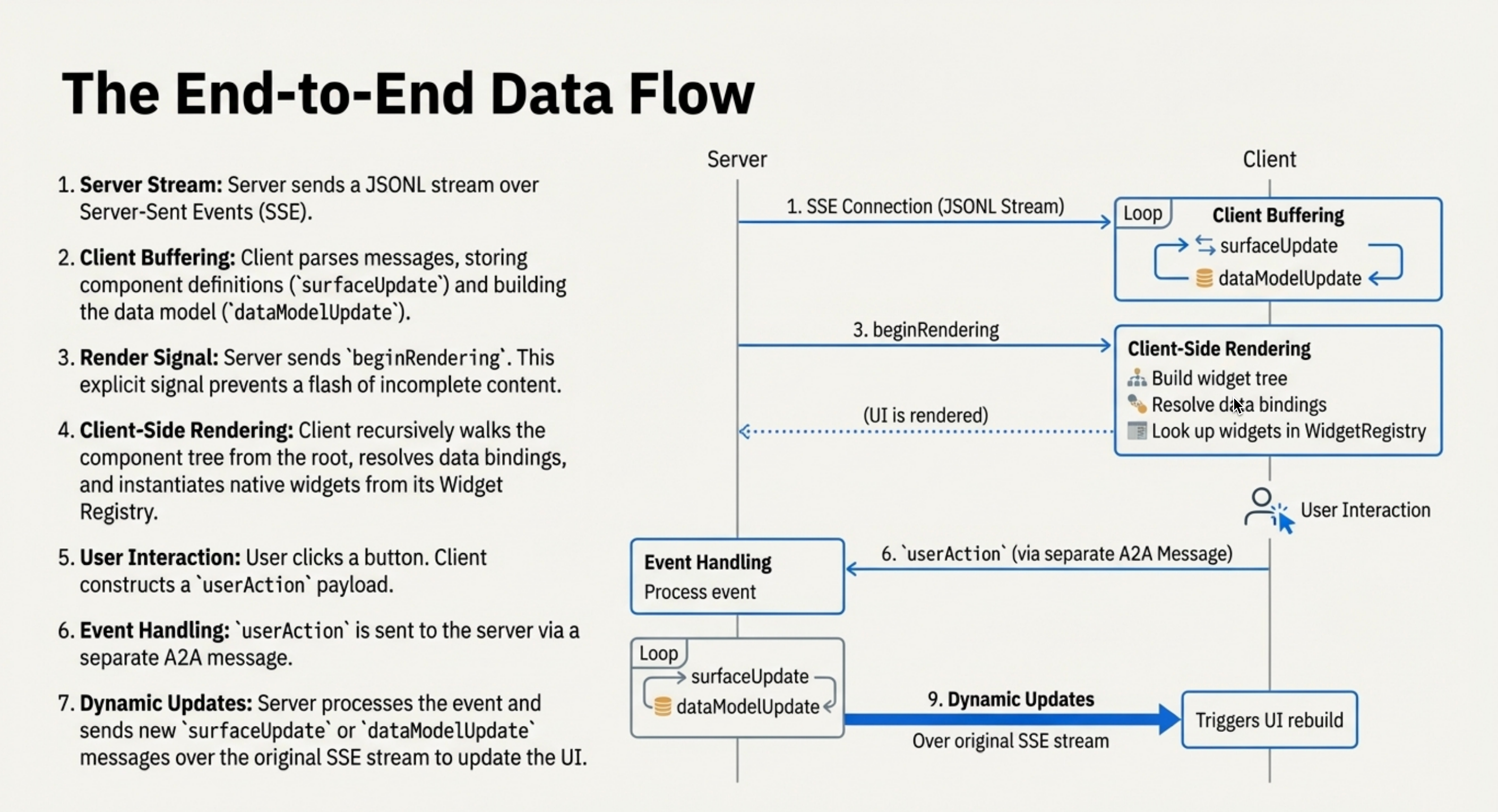
Agent (LLM) → A2UI Generator → Transport (SSE/WS/A2A)
                                      ↓
Client (Stream Reader) → Message Parser → Renderer → Native UI
Message Format
A2UI defines a sequence of JSON messages that describe the UI. When streamed, these messages are often formatted as JSON Lines (JSONL), where each line is a complete JSON object.
{
  "version": "v0.9",
  "createSurface": {
    "surfaceId": "main",
    "catalogId": "https://a2ui.org/specification/v0_9/basic_catalog.json"
  }
}
{
  "version": "v0.9",
  "updateComponents": {
    "surfaceId": "main",
    "components": [...]
  }
}
{
  "version": "v0.9",
  "updateDataModel": {
    "surfaceId": "main",
    "path": "/user",
    "value": { "name": "Alice" }
  }
}
Why this format?
A sequence of self-contained JSON objects is streaming-friendly, easy for LLMs to generate incrementally, and resilient to errors.
Lifecycle Example: Restaurant Booking
User: "Book a table for 2 tomorrow at 7pm"
1. Agent defines UI structure:
{
  "surfaceUpdate": {
    "surfaceId": "booking",
    "components": [
      {
        "id": "root",
        "component": {
          "Column": {
            "children": {
              "explicitList": ["header", "guests-field", "submit-btn"]
            }
          }
        }
      },
      {
        "id": "header",
        "component": {
          "Text": {
            "text": { "literalString": "Confirm Reservation" },
            "usageHint": "h1"
          }
        }
      },
      {
        "id": "guests-field",
        "component": {
          "TextField": {
            "label": { "literalString": "Guests" },
            "text": { "path": "/reservation/guests" }
          }
        }
      },
      {
        "id": "submit-btn",
        "component": {
          "Button": {
            "child": "submit-text",
            "action": {
              "name": "confirm",
              "context": [
                { "key": "details", "value": { "path": "/reservation" } }
              ]
            }
          }
        }
      }
    ]
  }
}
2. Agent populates data:
{
  "dataModelUpdate": {
    "surfaceId": "booking",
    "path": "/reservation",
    "contents": [
      { "key": "datetime", "valueString": "2025-12-16T19:00:00Z" },
      { "key": "guests", "valueString": "2" }
    ]
  }
}
3. Agent signals render:
4. User edits guests to "3" → Client updates /reservation/guests automatically
5. User clicks "Confirm" → Client sends action:
{
  "userAction": {
    "name": "confirm",
    "surfaceId": "booking",
    "context": {
      "details": {
        "datetime": "2025-12-16T19:00:00Z",
        "guests": "3"
      }
    }
  }
}
6. Agent responds → Updates UI or sends:
1. Agent creates surface:
{
  "version": "v0.9",
  "createSurface": {
    "surfaceId": "booking",
    "catalogId": "https://a2ui.org/specification/v0_9/basic_catalog.json"
  }
}
2. Agent defines UI structure:
{
  "version": "v0.9",
  "updateComponents": {
    "surfaceId": "booking",
    "components": [
      {
        "id": "root",
        "component": "Column",
        "children": ["header", "guests-field", "submit-btn"]
      },
      {
        "id": "header",
        "component": "Text",
        "text": "Confirm Reservation",
        "variant": "h1"
      },
      {
        "id": "guests-field",
        "component": "TextField",
        "label": "Guests",
        "value": { "path": "/reservation/guests" }
      },
      {
        "id": "submit-btn",
        "component": "Button",
        "child": "submit-text",
        "variant": "primary",
        "action": {
          "event": {
            "name": "confirm",
            "context": {
              "details": { "path": "/reservation" }
            }
          }
        }
      }
    ]
  }
}
3. Agent populates data:
{
  "version": "v0.9",
  "updateDataModel": {
    "surfaceId": "booking",
    "path": "/reservation",
    "value": {
      "datetime": "2025-12-16T19:00:00Z",
      "guests": "2"
    }
  }
}
4. User edits guests to "3" → Client updates /reservation/guests automatically
5. User clicks "Confirm" → Client sends action:
{
  "version": "v0.9",
  "action": {
    "name": "confirm",
    "surfaceId": "booking",
    "context": {
      "details": {
        "datetime": "2025-12-16T19:00:00Z",
        "guests": "3"
      }
    }
  }
}
6. Agent responds → Updates UI or sends:
Transport Options
A2UI is transport-agnostic — any mechanism that can deliver JSON messages works:
- A2A Protocol: Standardized agent-to-agent communication, also used for agent-to-UI delivery
- AG UI: Bidirectional, real-time agent-UI protocol
- REST / HTTP: Simple request-response or Server-Sent Events (SSE) for one-way streaming
- WebSocket: Persistent bidirectional connection, ideal for real-time updates and user actions
- Any other transport: gRPC, message queues, custom protocols — if it can carry JSON, it works
See transports for implementation details.
Progressive Rendering
Instead of waiting for the entire response to be generated before showing anything to the user, chunks of the response can be streamed to the client as they are generated and progressively rendered.
Users see UI building in real-time instead of staring at a spinner.
Error Handling
- Malformed messages: Skip and continue, or send error back to agent for correction
- Network interruptions: Display error state, reconnect, agent resends or resumes
Performance
- Batching: Buffer updates for 16ms, batch render together
- Diffing: Compare old/new components, update only changed properties
- Granular updates: Update
/user/namenot entire/model